Chrome Tab Explorer: A Convenient Tool for Managing Tabs
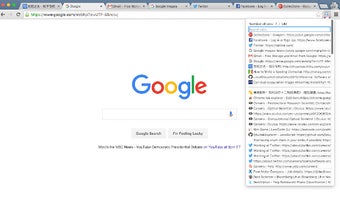
Are you tired of having too many tabs open in your Chrome browser and struggling to keep track of them all? Look no further than Chrome Tab Explorer, a handy extension developed by Fujun Du. This free add-on tool allows you to easily navigate through your tabs by searching keywords in the page title or URL. Additionally, it provides a tab count, helping you stay organized and efficient.
With Chrome Tab Explorer, you can say goodbye to the frustration of losing tabs in a sea of open windows. Simply enter a keyword related to the tab you're looking for, and the extension will filter and display the relevant results. Whether you need to quickly find a specific website or want to locate a tab based on its content, this tool makes the process effortless.
Another useful feature of Chrome Tab Explorer is the ability to bookmark all tabs in a directory under the "Other Bookmarks" section of your bookmark folder. This is particularly helpful when you have a collection of tabs related to a specific topic or project that you want to save for later reference.
To access Chrome Tab Explorer, simply press "Alt + T" and the extension will be called out, ready to assist you in managing your tabs. It's a simple yet powerful tool that enhances your browsing experience and makes tab management a breeze.
If you find yourself overwhelmed by the number of tabs open in your Chrome browser, Chrome Tab Explorer is the perfect solution. Get organized and stay efficient with this free add-on that simplifies tab navigation and provides valuable features to streamline your browsing experience.